

Family Bridge features
What is Family Bridge?
Family Bridge is a co-parenting app for separated or divorced parents. It lets you share a custody calendar, keep conversations organized by topic and by child, log and approve child expenses, coordinate custody exchanges and store important documents. It works on iPhone (App Store), Android (Google Play) and on the web from any browser, all with the same account, in English, Spanish, Portuguese, French, German, Italian, Dutch, Polish and Japanese. Couples who live together use it as a shared family calendar and family organiser: events, messages, expenses, lists and documents, without the custody sections.
Shared family calendar
Events, doctor appointments, school activities and birthdays, with reminders, recurring events and RSVPs. Two homes or one, everyone sees the same schedule.
Custody calendar
Color-coded custody periods for each parent, patterns like alternating weeks, 2-2-3 or 5-2-2-5, and who has the kids today.
Coordinated exchanges
Pickup proposals and counter-proposals, safe meeting places, running-late alerts, an alert when the other parent reaches the meeting point and a record of every exchange.
Organized messaging
Conversations by child and by topic (health, school, expenses…), with replies, reactions, read receipts and moderation.
Child expenses
Log expenses, split them 50/50 or by the percentage you agree on, and the other parent approves them. A clear balance of who owes whom.
Child support
A record of child support: the agreed amount, each payment made outside the app with its receipt and the confirmation that it arrived. Family Bridge does not process, transfer or hold money. Setting it up and logging payments is Pro; the other parent confirms or disputes for free.
A profile for each child
Medical info, allergies, appointments, activities, emergency contacts and everything school-related: subjects, grades and assignments.
Important documents
IDs, passports, prescriptions, school reports and court orders in one place, with expiration reminders.
More features
- Notifications with per-topic preferences and quiet hours
- Calendar, messaging, expense and school reports
- A parent community to share experiences
- Points, badges and a harmony score that encourage cooperation
- Family AI Helper: ask about your messages and it answers quoting where it was said, summarizes conversations and, with “Help me reply”, suggests three replies (friendly, brief or offering an alternative)
- AI reading: a date in the chat becomes an event, a photo of a receipt becomes an expense and a transfer receipt becomes a child support payment
- Caregiver mode: grandparents and babysitters with their own access, their shifts and an “I’m here” check-in when they arrive
- Shared shopping and to-do lists
- Link with the other parent by email or a 6-digit code
- App available in English, Spanish, Portuguese, French, German, Italian, Dutch, Polish and Japanese
Pro includes everything in Free, plus:
- Unlimited children, events, expenses, documents and places
- Photos, videos and files in chat
- Family AI Helper: ask about your messages, summaries, “Help me reply” and reading dates, receipts and payment proofs
- Export conversations and reports to PDF, and the financial report to CSV and Excel (by month or by year)
- Calendar export and import (ICS)
- Advanced custody patterns
- Exchanges with GPS, photo and signature
- Several receipts per expense and a full financial dashboard
- Child support: set the amount and log payments with receipts
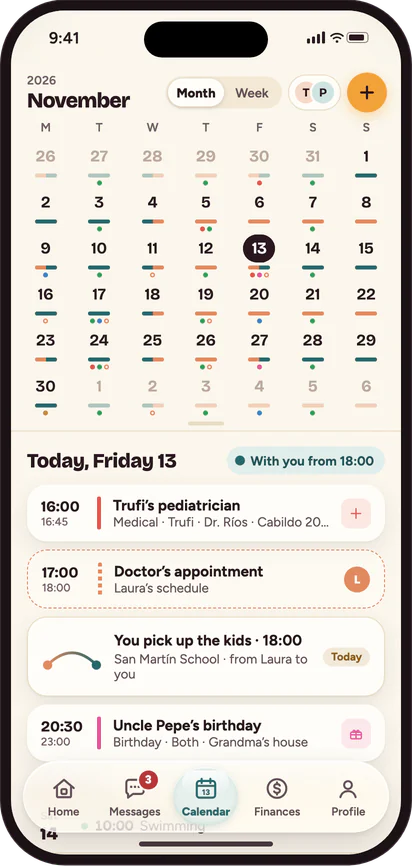
Always know who the kids are with 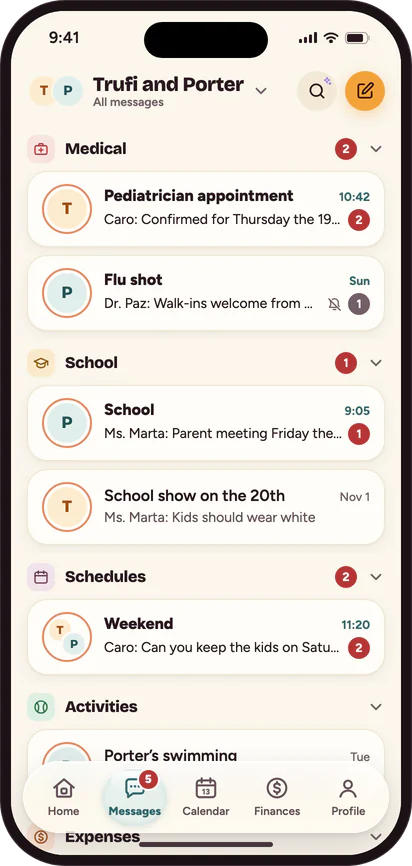
Conversations sorted by topic 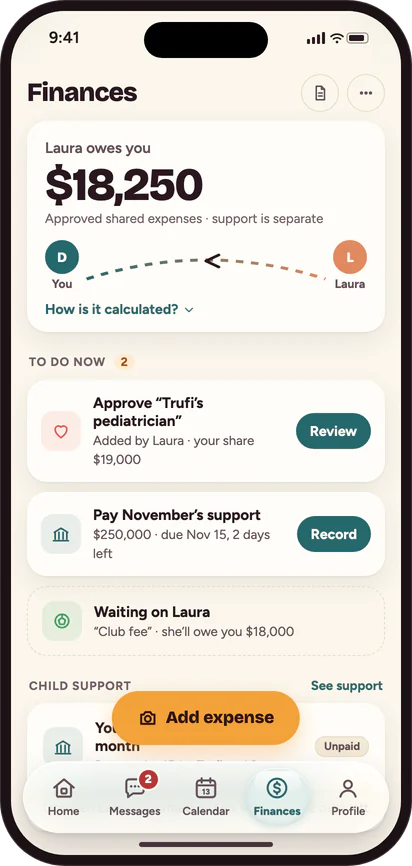
Clear expenses, no spreadsheets 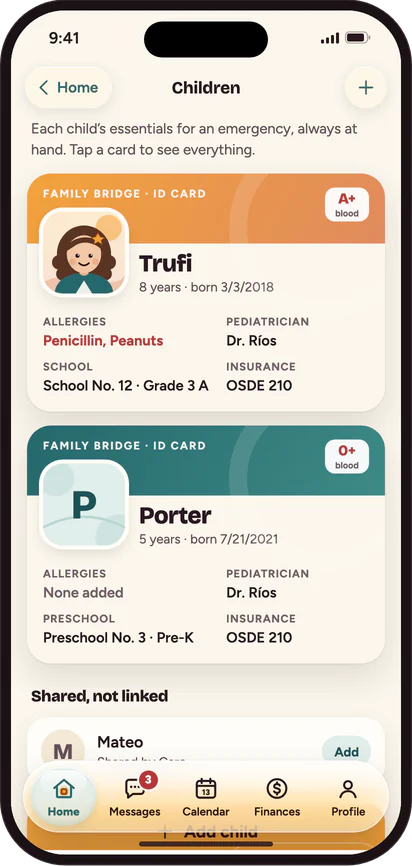
A profile for each child
Get started today, free
Download Family Bridge on your iPhone or Android phone, or create your account on the web.